|
Forex Trades |

|

|
|
|
Forex Trades |
|
|
Forex Trades
|
Forex Trades |
|
|
|
|
Forex Trades |
|
|
Foreign exchange trades on margin can be entered into Captools/net by setting up a pseudo security which indicates both currencies involved in the trade. This is done to facilitate trades where neither currency is necessarily the account base currency. The recommended symbol notation is the same notation used by Captools/net to indicate relative currency exchange rates, e.g.:
"€>C$" would indicate the exchange rate converting Euros to Canadian dollars.

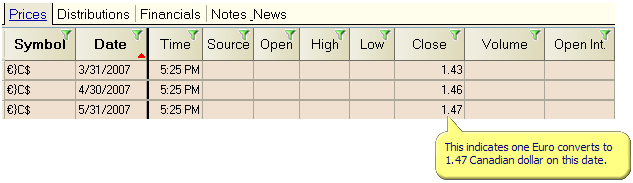
For this example, the price history records for the exchange rate from Euro to Canadian Dollar would be something like this if one Euro converts to more than one Canadian dollar.
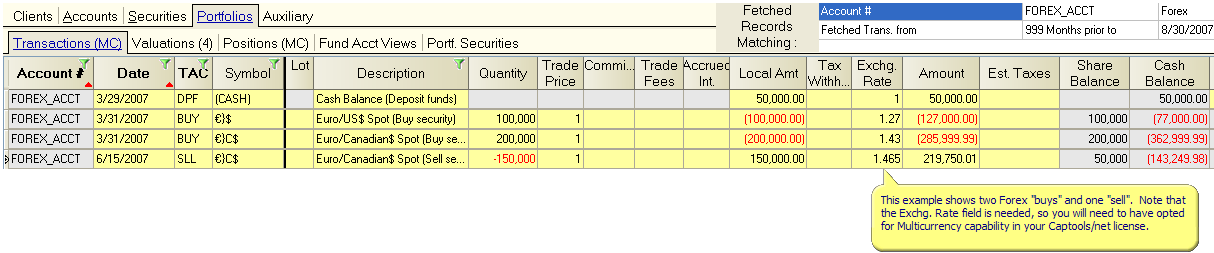
Once the exchange rate symbols have been established in the Security Id records, trades can be entered similar to the following:
On the portfolio Position records the relative exchange rates are pulled into the "X-rate" field from the Price History records and the applicable value is extended from this. Note that the "Market Price" field is held at "1".
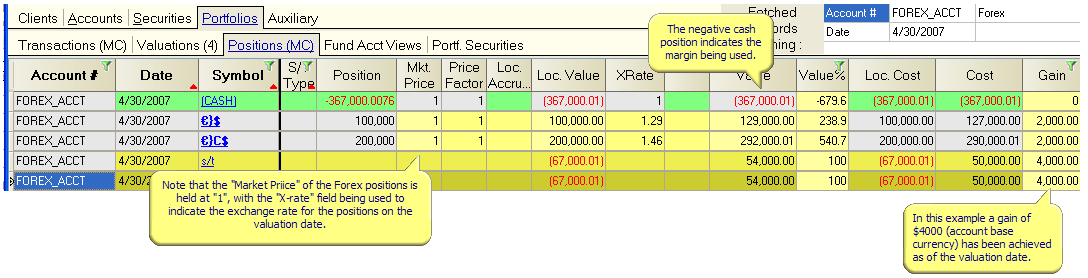
If the exchange rates have not been entered into the price history records, then you can enter them directly into this view and the price history records will be updated.
Currency futures - See the topic Commodity Futures for examples of how assigning "Contract for Difference (CFD)" or "Future" to the specification "Option or Contract Type" in the security record can be used to account for futures. This methodology will apply equally to currency futures. Note that in this case you will use the "Mkt Price" field to price the currency futures, not the "Exchange Rate" field as in the example for Forex Trades. This is because the contract for difference computation operates on the market price, not the exchange rate.