|
Account Notes |

|

|
|
|
Account Notes |
|
|
Account Notes
|
Account Notes |
|
|
|
|
Account Notes |
|
|
The Account notes records give you the capability to store and retrieve dated notes concerning your clients and their accounts. In the tabular grid view these notes appear as follows when you have tabbed in from a selected account record:
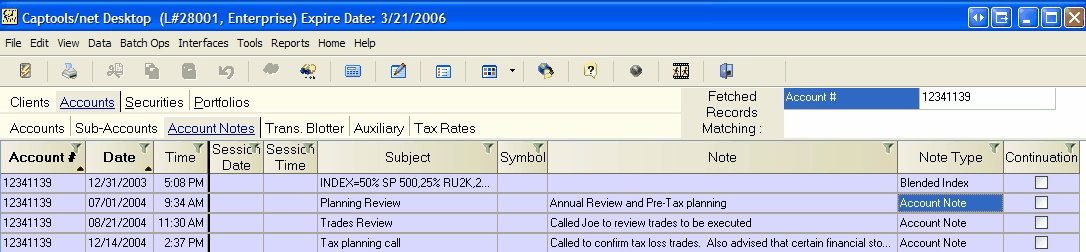
The Account Notes data fields operate as follow:
Account # - The account associated with the note
Date/Time - The date and time the note was created.
Session Date/Time - The date and time of the meeting or conversation to which the note refers.
Subject - Brief description of the note
Symbol - Ticker symbol, if applicable, e.g. if the note refers to a particular trade.
Note - Note contents. This field can be viewed and edited in full detail by opening the record in the "Edit" mode.
Note Type - This the type of note as follows:
Account Note - Indicates this is an ordinary note, which has no effect on data processing.
Report Footnote - Indicates this is a note containing a custom report footnote which will be used in reports for this particular account. The footnote will be the contents of the "Note" field and will be placed in a "User Text" area of a report for the applicable client provided that you place the notation "ant_RptFootnote" in the User Text area of the applicable report and activate that area using the associated checkbox. See the sub-topic Creating/Customizing Reports_(Account_Notes).
Blended Index - Indicates that the subject field of this note specifies a "blended index" composition which will be used for this account when the report field "Blended Index ROI" is chosen.
Investment Style Change - Indicates that this note is used to indicate a change in "Investment Style" for this account. This record will be automatically generated when a user changes the "Investment Style" field in an account record (Level 4/above) and will be used in reporting charts that indicate model allocations.
Report Client Title - Indicates that the note field of this specifies a custom account identifier to be used in reports for this account in lieu of the formal "Account Title" field.
Fee Debit Account Spec. - Indicates that the Subject field of this note specifies the account(s) to be debited for this account as of the date of the account. If more than one account is to be debited, the account numbers must be comma separated and the debits will be pro-rated based upon debit account value.
Continuation - Identifies that the note is a continuation of the immediate prior note for this account.
In the grid view, the note is shown in abbreviated form, but can be viewed in full by clicking upon it to open the Client/Accounts "Edit" view on which you may see the note as shown in Client/Account Edit View.
Account notes can also be used for specialized purposes such as specifying account-specific blended indices as shown in the topic Benchmark Indices, or for storing an account-specific report footnote.