|
System Architecture |

|

|
|
|
System Architecture |
|
|
System Architecture
|
System Architecture |
|
|
|
|
System Architecture |
|
|
System Architecture is a term denoting the arrangement of computer hardware and software which comprises the system which performs the desired business function.
Captools/net's system architecture has been designed to accommodate usage in situations ranging from single users to large office, multi-user, multi-site situations.
Single-User Versions - Many users are only familiar with single user software running on a single computer sitting in front of them. This could be described using the following diagram.
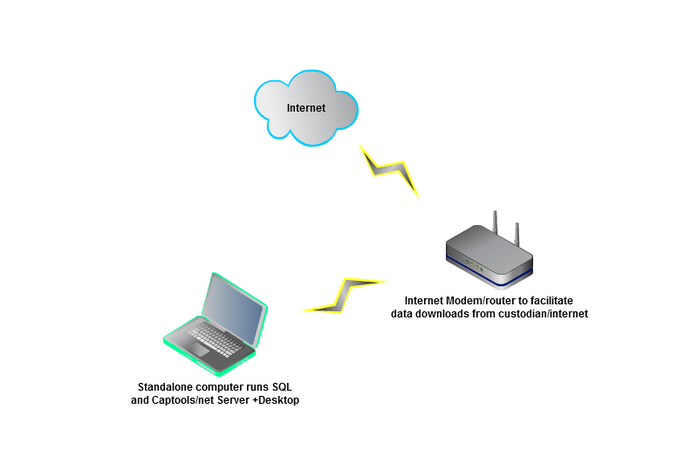 |
Single user versions of Captools/net use this system architecture. The Captools/net software is actually a suite of programs which interact with each other, but they all must reside upon a common computer.
Multi-User Versions - Software whose data is designed to be able to be accessed simultaneously by multiple users, must employ a more complex system architecture. In these systems, the data typically resides upon one computer called a server and is accessed by users from other computers running software called client software. This arrangement is used by multi-user versions of Captools/net, and can be depicted as follows for a typical small-office setup:
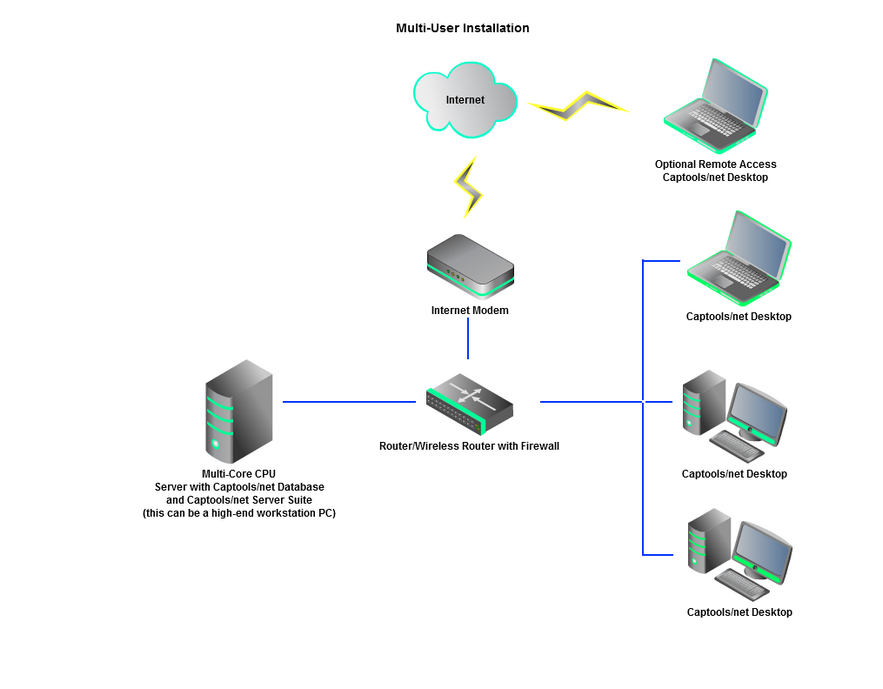
In this example, the Database and Captools/net Server-side applications are shown as residing on the Server computer. The Database actually consists of the files which contain the actual data, and the software that processes the SQL commands operate on that data, including fetching and updating data. The Captools/net server-side software consists of a number of programs which request data from the database software and pass that data on to the client computer, or which perform computations on the data to either generate output such as reports, or which gather data from external sources such as custodian data files or web downloads to populate the database.
The Captools/net Desktop software provides an end user with a view into their data and gives them an opportunity to edit data with an editing friendly interface. However, it performs very little in the way of computations or other functions. These are performed on the server computer. This means that most important software updates can be confined to the server computer, thereby simplifying I.T. department's and the user lives in a large organization with many users.
Many of the important data-handling and computational tasks are triggered on an automatic basis, (e.g. data downloads, scheduled valuations, etc.) or are left to be managed by a dedicated data administrator. Many of these tasks can be administered remotely through browser-based interfaces, as can the reporting process.
Remote Hosted Installation - For any of the single user, small office or large office models, your Captools/net server installation can be on a virtual machine remotely hosted on-line by a third party remote hosting solution provider in a "cloud-like" manner. Although remote hosting will involve additional expense, it will give you the advantages of 24/7 operation, system backups, IT oversight, resource scalability, as well as accessibility from any location with broadband access, a plus for those who travel often or maintain multiple offices.
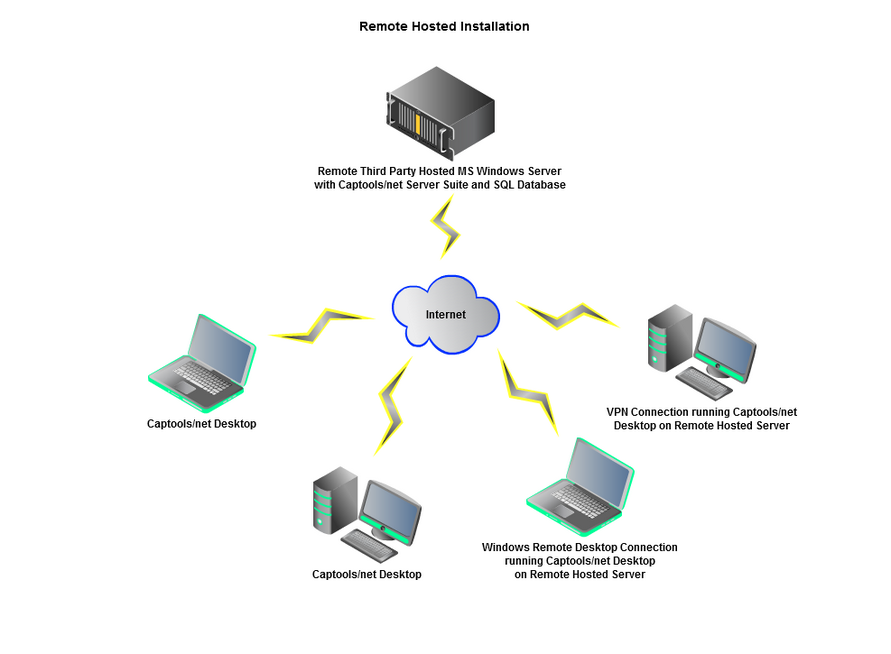
In the remote hosted scenario, you can install and run the Captools/net Desktop on your local machine and access the Captools/net Server via your internet connection using secure SSL and HTTPS protocols. You can alternatively access a copy of the Captools/net Desktop running on the remote machine using Windows Remote Desktop Connection (if supported by your remote hosting company) or via the VPN connection provided by your remote hoster.